Flashcards may seem almost too simple to deserve serious attention. A question on one side, an answer on the other. Hardly revolutionary.
And yet, when used well, flashcards can become one of the most powerful tools we have for helping students remember more, forget less, and revise with greater purpose. This is because they support consistent revision habits over time and an important learning principle called retrieval practice. In other words, getting students to actively bring knowledge to mind rather than merely re-read it and hope for the best.
That matters enormously for educators. Too often, students mistake familiarity for learning: highlighting, rereading, and copying notes without ever truly testing their understanding. Digital flashcards offer a practical way to disrupt that pattern.
Used well, they make retrieval practice easier to sustain, organise, and integrate into everyday routines, whether that’s a few spare minutes between lessons or a more structured revision plan across the term. Flashcard platforms such as Brainscape take this further by building in principles from cognitive science, including spaced repetition and confidence-based feedback.
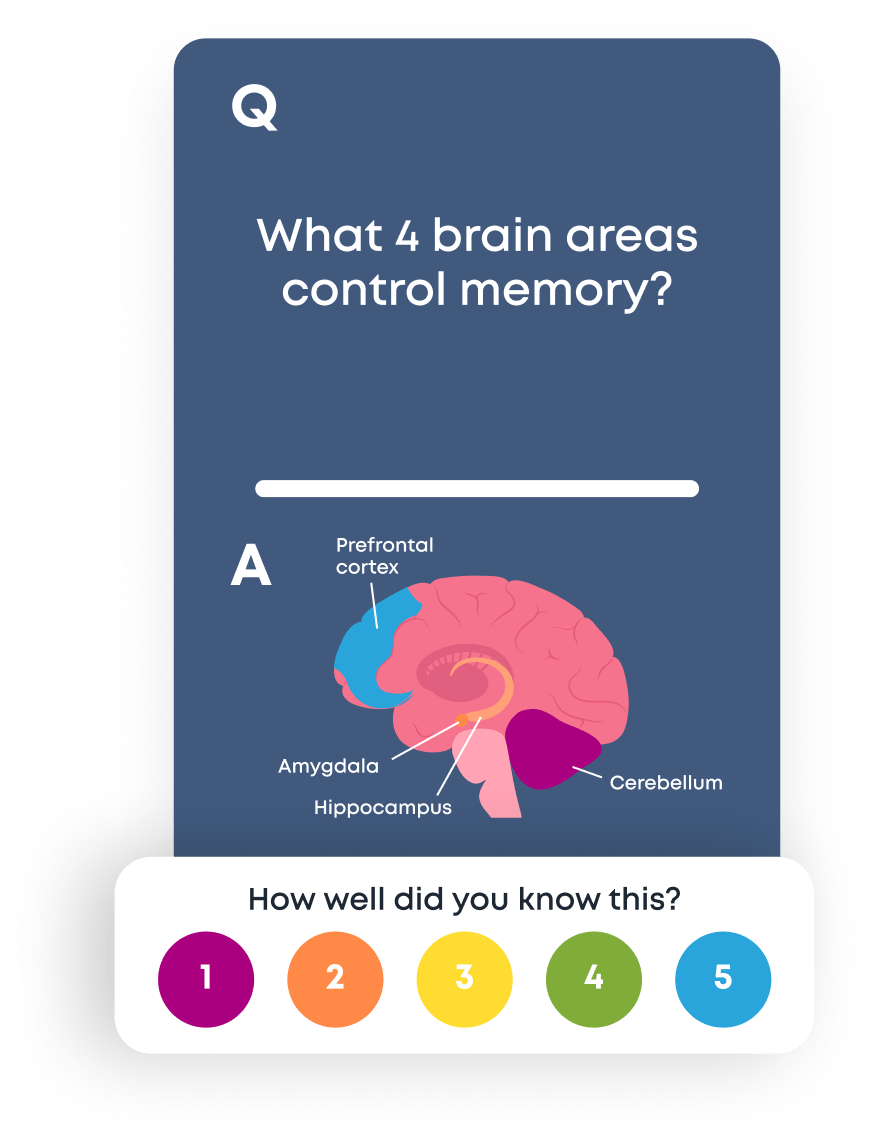
They can be used across subjects, units, and topics, from history, biology, and language to law, medicine, computer science, and more. They can also be suitable for all ages, from early childhood development to adult learning.
And so, in this article, I explore why digital flashcards deserve a place in every educator’s toolkit: not just as a convenient study aid, but as a way to improve accessibility, reduce workload, and help students build consistent, effective revision habits that genuinely support long-term learning.
Digital Flashcards Are Convenient to Carry Around & Use
A clear advantage of the digital flashcard over paper, is the convenience of having access to an unlimited amount of flashcards within one digital device. A student can store and organise their flashcards in one place, usually in a flashcard study app like Brainscape, Quizlet, or Anki, that can be with them at all times, or most of the time.
When a student has multiple decks of flashcards across different subjects or units, it’s not practical to physically carry them around. Yes, a student could do that but there is a significantly higher risk of the paper flashcards being lost, destroyed, forgotten or mixed up.
Digital flashcards are portable, they can be accessed on one device or multiple devices. Flashcard apps like Brainscape, for example, automatically sync across devices, allowing students to revise anytime, anywhere with the mobile app or on their desktop or laptop computer.
This convenience matters, because it increases the likelihood of students using the flashcards to study. An effective study strategy won’t make an impact if students don’t use it. If the flashcards are easily and readily available, students are much more likely to use and use them regularly.
Digital flashcards can be used in school, in between lessons, outside of school, on the bus, waiting in line or simply any opportunity that arises; but only if the student has the flashcards to hand. This consistent approach is enabled by the convenience of the digital flashcard.
Digital Flashcards Are Easy to Organise, Track & Monitor
It is possible to organise and maintain paper flashcards, but as with most things, the digital version is much easier and reduces the burden for students.
Paper flashcards can be arranged into different piles, categories and folders but again how practical is this?
In order for students to use flashcards to maximise their progress, they should be looking to close gaps in knowledge. If students continually revisit the flashcards that they can answer with ease and speed, then they should be prioritising the flashcards and content they have not yet mastered.
Digital tools make the organisation, tracking, and monitoring much easier for the student. This is one less thing for them to dedicate their attention to and it promotes effective study habits, directing study to where it needs to be, not revisiting their favourite topics again, or their areas of strength.
Digital Flashcards Are Accessible to a Wide Spectrum of Learners
Effective study strategies benefit all learners, not just some. Students that require additional support, due to a learning difficulty or disability can benefit from digital flashcards:
- A clear font can be selected, and often the font size can be increased if needed.
- Audio can be added; for example, questions can be read aloud.
- Images can be included to accompany the text or question, where appropriate.
The latter is not to decrease the challenge but to increase the accessibility.
Linked to the points above, if students struggle with organisation or tend to lose equipment, again having the flashcards in one portable place can be very helpful. Digital formats offer options that a paper flashcard simply cannot.
See: Flashcards and ADHD and Flashcards and Dyslexia
Digital Flashcards Promote Retrieval Practice
There can be a temptation for students to look at the question or key term on the flashcard, think to themselves for a moment or two, and then flip the flashcard over to reveal the answer.
But then retrieval practice hasn’t taken place!
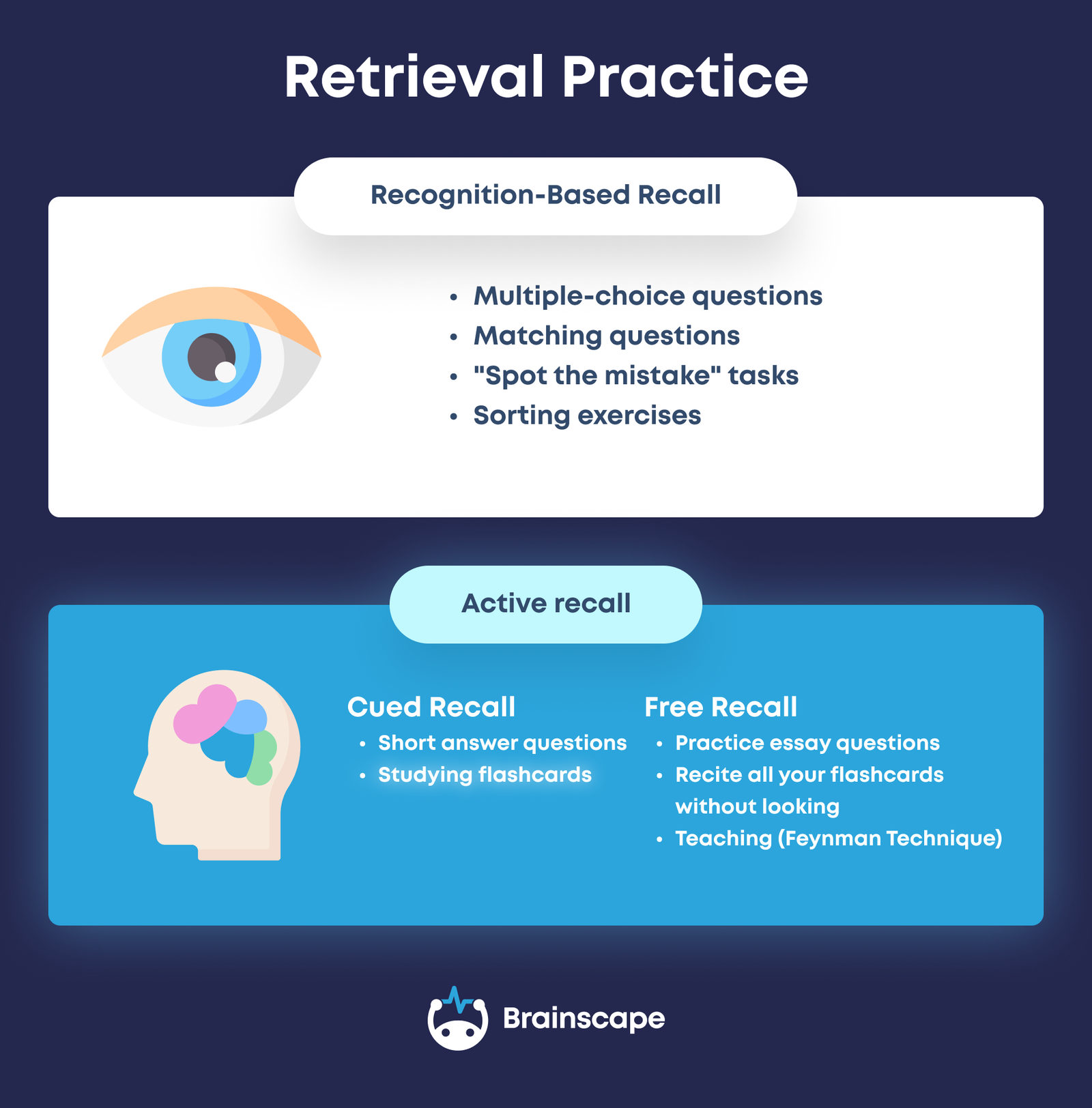
Retrieval practice requires learners to generate a response from their long term memory. (In other words: recall information from scratch.) This can be verbal, written, selecting, or inputting an answer.
In the case of digital flashcards, the mode is most often verbal or thought-based, with the learner speaking or thinking the answer in full before turning the flashcard over. This exercise is incredibly valuable for solidifying long-term memory.
Digital Flashcards Are a Vehicle for Spaced Practice (or Spaced Repetition)
I have written extensively about retrieval practice and spaced practice, I argue that they are two sides of the same coin. They must be combined. Students could quiz themselves the night before the exam, this would be crammed retrieval practice.
If the retrieval practice reveals gaps in knowledge, and the exam is tomorrow, the student doesn’t have much time to close that knowledge gap! They will likely resort to unhealthy habits like caffeine, reduced sleep and will no doubt be feeling the pressure.
Spaced practice promotes a gradual and consistent approach to retrieval practice over time.
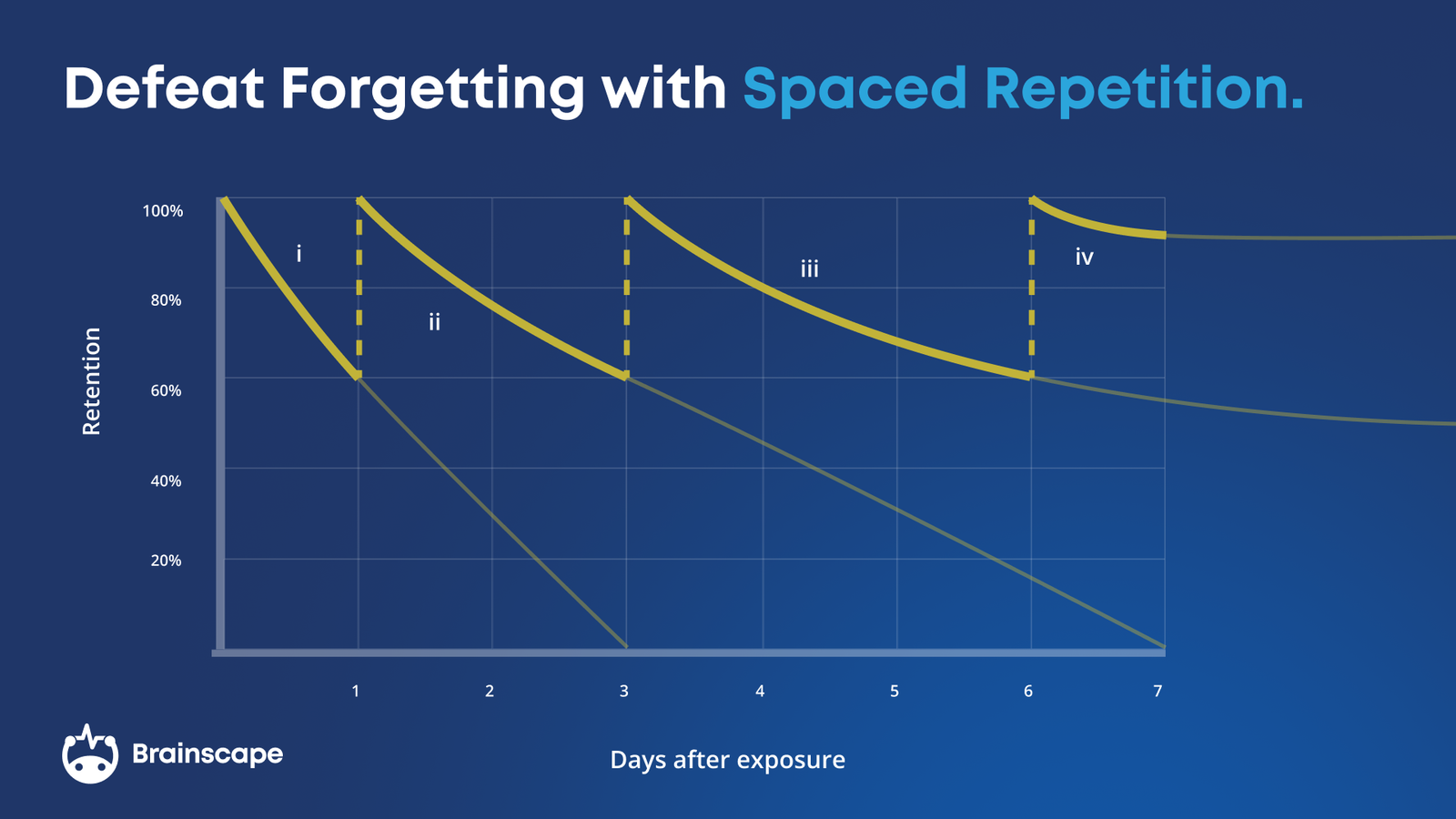
Digital flashcards make spaced practice much easier, and can help students to follow a spaced practice study schedule, in contrast to ad hoc or cramming.
Digital flashcard platforms like Brainscape are designed based on the key principles from the science of learning. They are evidence based to help students learn better and faster with spaced repetition and retrieval.
With the Right Platform, Digital Flashcards Are Easy to Source or Create
A question I have been asked numerous times from educators, students and parents is the following; “Is it better for students to make their own flashcards or use pre-made flashcards?”
Again, it depends.
Younger learners can use flashcards but they will not have the skills to create appropriate flashcards. Older learners can create their own but it is essential they are asking the right questions. Does the content align to the exam criteria and specification? Are they appropriately pitched? Is the feedback provided accurate?
Digital flashcards like Brainscape give users the option to make their own or find flashcards. Generative AI can also create bespoke and relevant flashcards, based on a detailed and thorough prompt. It can be a very useful activity to create flashcards but it’s not cheating using pre-made flashcards, as long as they still provide opportunities for regular retrieval practice.
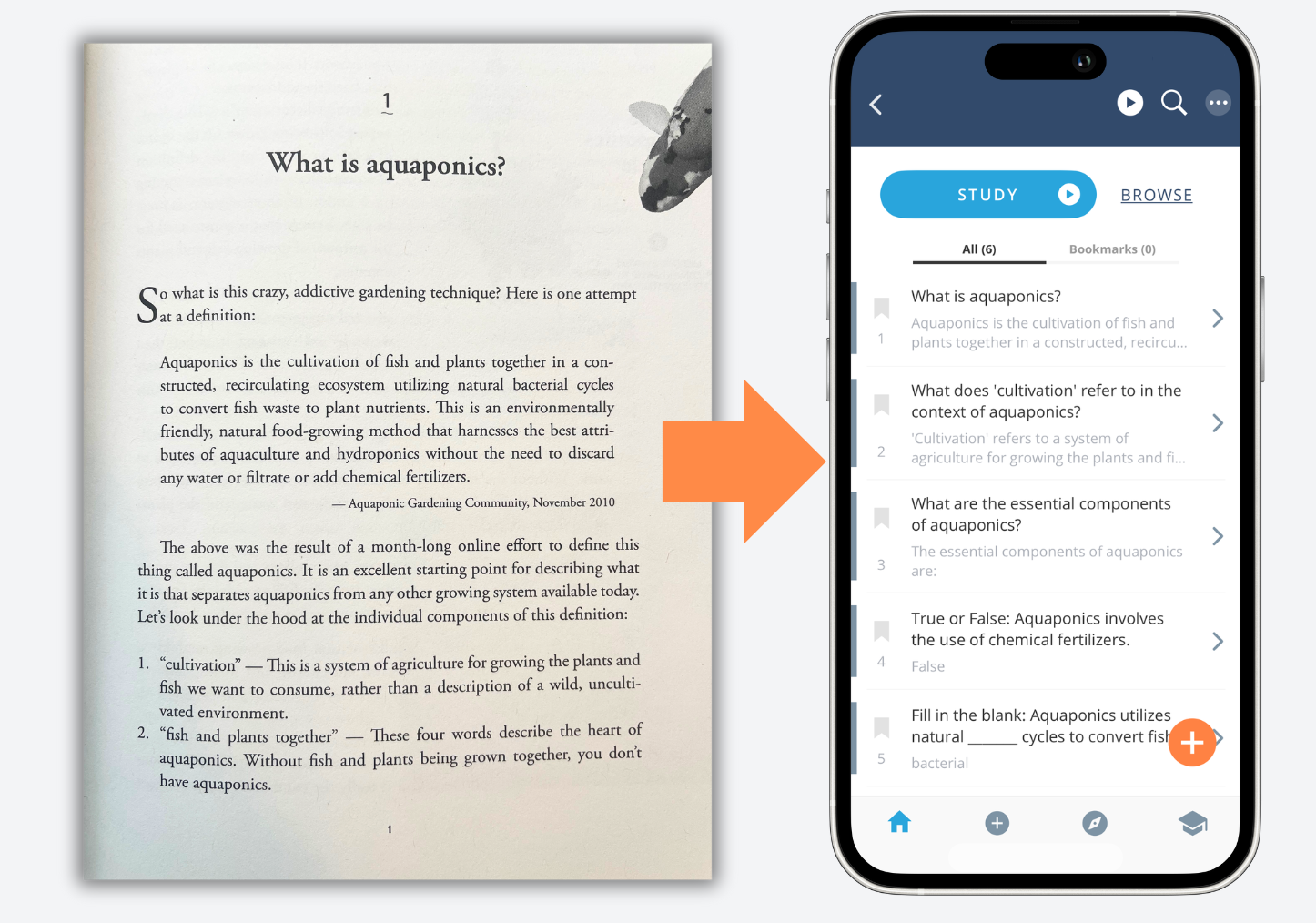
Brainscape allows users to manually type flashcards, import or paste existing flashcards, or flashcards can be created based on a summary of the content or using AI. Another example of a flexible option, that is only available with digital flashcards.
Digital flashcards can also be quickly edited and adapted if needed. Students don’t need to start from scratch, there is support there if they need but also the option to create their own if they are able to.
Digital Flashcards Are Easy to Duplicate & Share, Saving Teacher Time
Linked to the point above, I did spend time creating a set of flashcards for one of my exam classes. The purpose of this was to demonstrate and model to my class what effective flashcards looked like. I also then instructed students, as part of an ongoing homework, to use their flashcards.
My students were very grateful for the flashcards and they did use them but it was a considerable task for me in terms of my time and workload. I created the flashcards digitally and then printed a set for each individual. I also then individually cut out the flashcards so students had a ready made pack. This was not the best use of my time and not something I could replicate with my other classes, or for other units.
However, if a teacher creates or generates a digital set of flashcards students can access them instantly, supporting teacher workload and time. Groups of students could also collaborate, delegate and share digital flashcards if they all have access to the same online platform.
Digital Flashcard Platforms Allow Teacher to Monitor & Track Revision Habits
After a test or assessment, if a student is disappointed with their results, I ask them three questions:
- How did you study and prepare?
- When did you study and prepare?
- How long did you spend studying and preparing?
The answers can reveal where students can improve their study skills.
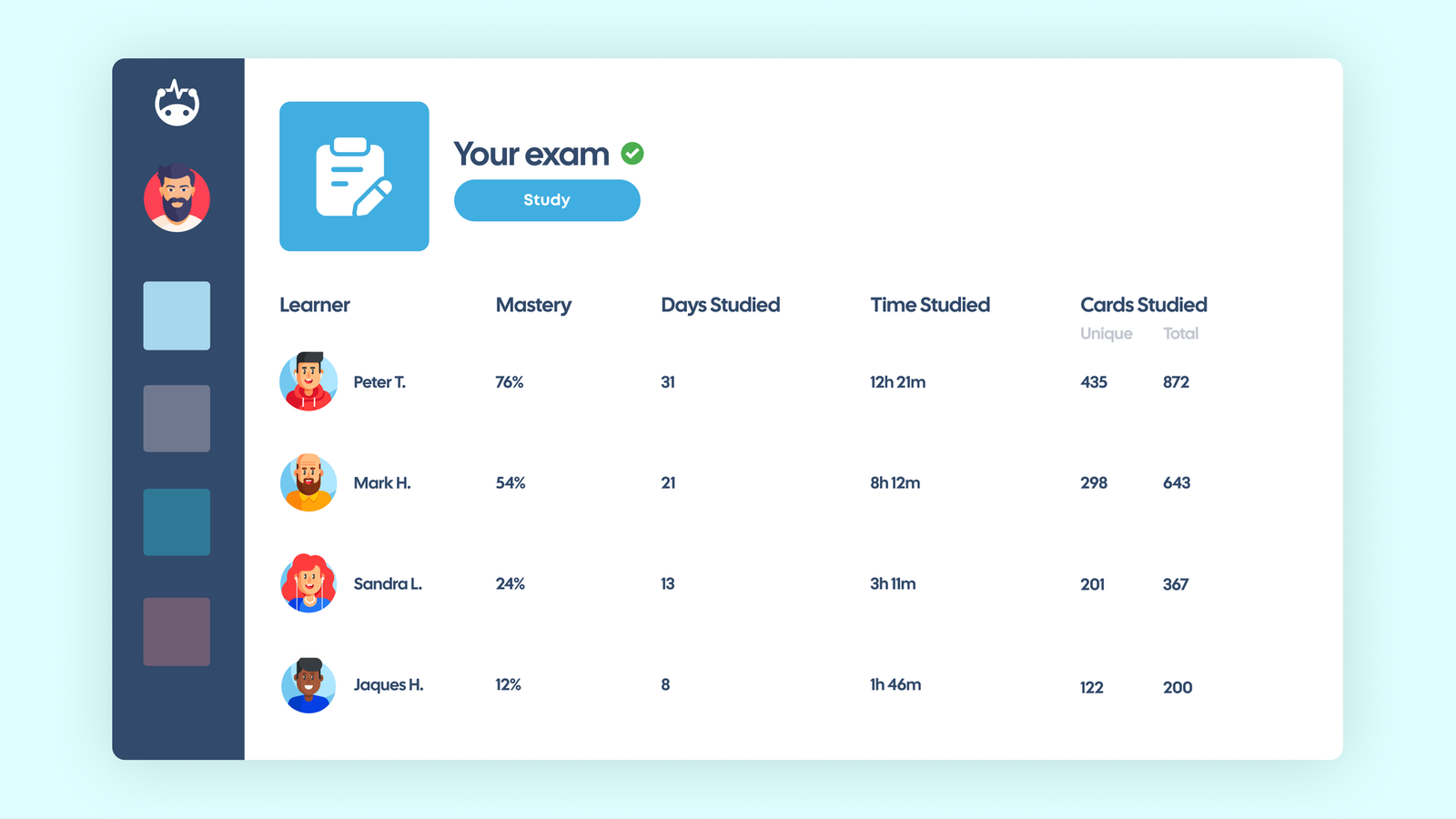
The third question is often the one students struggle to answer. They don’t know how much time they’ve spent studying because they don’t track or record this. If they use a digital flashcard app like Brainscape, however, this information is automatically recorded for them.
This can be useful for tracking and reflection. This replaces guesswork with concrete data.
9. Digital Flashcards Provide Immediate Feedback
Feedback is an essential and often underrated feature of flashcards, paper or digital. The correct answer, definition, term or translation must be easily available for the user.
Effective flashcard use is not just about checking whether an answer looks familiar, it is about generating evidence of what the learner knows, or doesn’t know. This should then inform the students next steps and signpost where to focus on next.
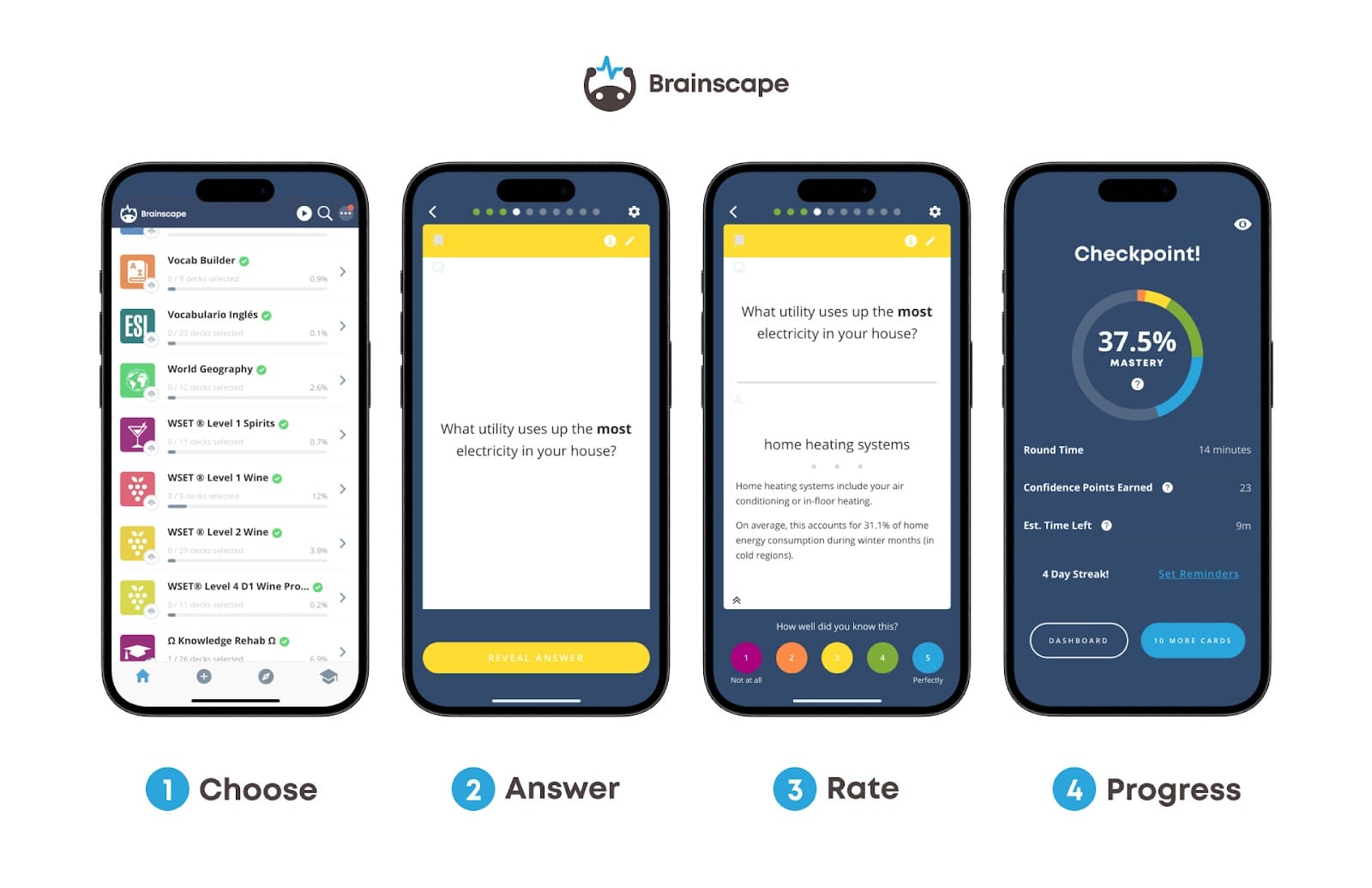
Digital flashcards don’t skip the feedback. Brainscape asks users to rate their level of confidence for each question, based on how well they knew the answer from a confidence rating 1-5. Digital flashcards can focus on revisiting content based on previous feedback.
10. Digital Flashcards Are Much More Motivating to Use
There are lots of digital apps that tap into the feature of a daily streak. This encourages users to be consistent, an approach that is essential to spaced practice. These features can motivate learners to maintain their streak and continue their studies.
Digital flashcards can make studying more manageable, remove challenges and barriers and therefore increase the likelihood of students using them as part of an established study routine, developing productive learning habits.
Paper Flashcards or Digital Flashcards? The Debate Over Screen Time
A traditional flashcard is created by paper or card. However, like most things in modern society, there is a digital counterpart; the digital flashcard.
Technology continues to develop at an impressive and intimidating pace. There are numerous concerns being raised by politicians, school educators and parents about the increasing use of screen time. Questions are being asked about the role of technology with learning.
Many issues raised focus on the safety and wellbeing of young people, which is paramount. Do screens help or hinder learning? The answer of course, is that it depends.
Technology can absorb attention, focus and time (from children and adults alike) but it can also enrich, empower and educate. Technology has become embedded in the daily routine of many individuals. If students are using screens, the argument could be to focus on what they are using the technology for and for how long.
Paper flashcards are effective if they enable retrieval practice (not re-reading of copied information) and whilst they are useful, digital flashcards can offer several practical advantages to students that use them, and for parents and teachers too.
A Final Note on Digital Flashcards
The benefits of digital flashcards are not arguments against paper resources and materials, they are simply factors to take into consideration. The benefits of technology do not remove the challenges; for example ensuring all students have access to devices and Internet and being aware of distractions.
These are all valid considerations.
The point is not that paper flashcards are obsolete, but that digital flashcards offer numerous advantages with flexibility, organisation, spacing and sustainability, factors worth considering if we’re serious about supporting students to develop sustainable and effective study habits.
Meet the Author: Kate Jones

Kate Jones is a highly experienced teacher, leader, bestselling author, and award-winning international speaker with a global reputation for championing evidence-informed, practical approaches to teaching and learning.
She is the author of numerous published books, including the bestselling Retrieval Practice series, which has become a go-to resource for teachers seeking to embed cognitive science into everyday teaching. Her most recent publication focuses on feedback strategies that are both impactful and sustainable, supporting teacher wellbeing and student progress. In addition to her writing, Kate is the editor of ‘The researchEd Guide to Cognitive Science’ (2023).
Kate has worked with schools across the UK and internationally, delivering keynote presentations, workshops, and consultancy support in a wide range of settings. Her work is known for its clarity, practicality, and focus on what truly makes a difference in the classroom. Based in the UK Kate continues to share resources and reflections on social media via @KateJones_Teach.